 Cheese Wheels Apps
 Markdown
 docs
Markdown for Confluence Cloud
Show Markdown on Confluence pages — rendered like GitHub, styled like Confluence.
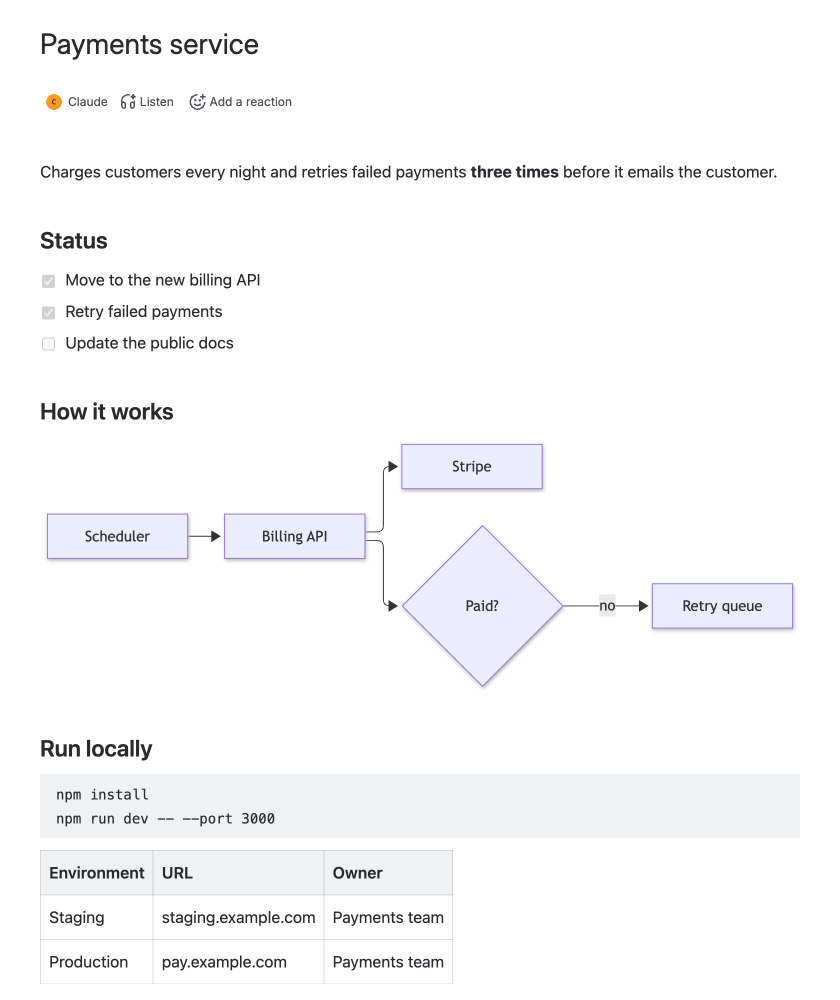
Markdown adds one element to the Confluence editor: the Markdown macro. Paste or write Markdown in it — from GitHub, an AI chat or a .md file — and it shows on the page as formatted content: headings, tables, task lists, code with syntax highlighting and Mermaid diagrams.
The macro can also show a .md file attached to the page, such as a project README.
Get started
- Install the app on your Confluence Cloud site.
- Add Markdown to a page, or show an attached .md file.
- See what Markdown is supported and how to draw Mermaid diagrams.
What else to know
- Found by search. Confluence search finds the text inside the macro, like any other page text. See Confluence search.
- Clean export. PDF and Word export get real Confluence content, diagrams included. See PDF and Word export.
- Written by AI agents. Agents and scripts can add Markdown through the REST API or MCP. See AI agents and the API.
- Your content stays in Atlassian. The app is built on Atlassian Forge and stores nothing of its own: your Markdown is saved in your page, by Confluence.
- Nothing is ever lost. If your subscription ends, the Markdown shows as its source until it’s renewed. See Subscription and licensing.