 Cheese Wheels Apps
 LaTeX
LaTeX docs
Symbols and ready-made formulas
Don't remember a command? Pick the symbol, and the editor types the LaTeX for you.
The quick strip
Under the code box is a strip of the most-used templates: fraction, power, index, square root, times, plus-minus, brackets, sum, integral, limit, matrix and π. Click one to insert it at the cursor.
Templates with a blank, such as the fraction, put the cursor where you type next.
All symbols
Choose All symbols at the end of the strip to open the symbol library.
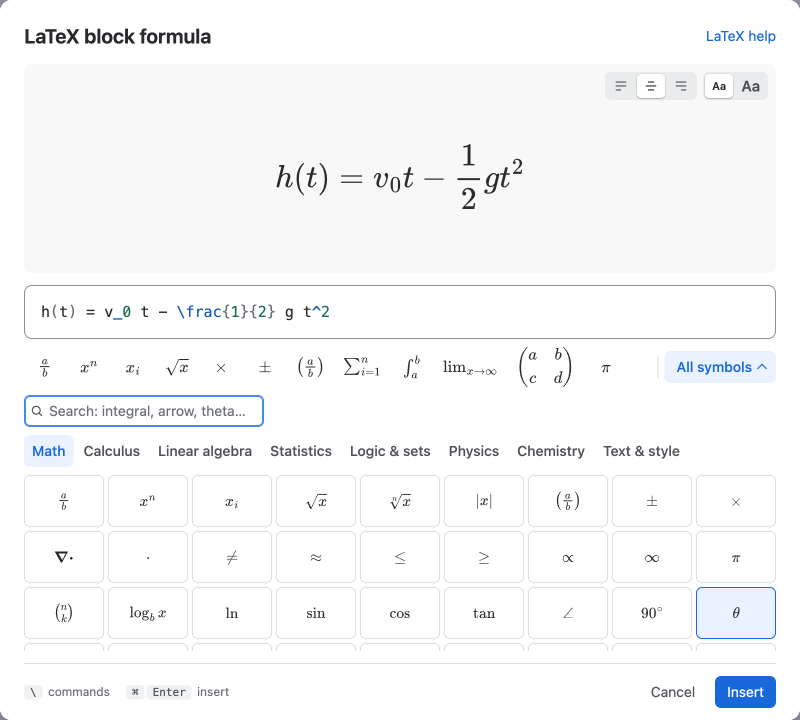
- Browse by subject with the tabs: Math, Calculus, Linear algebra, Statistics, Logic & sets, Physics, Chemistry, and Text & style.
- Or search: type a word such as integral, arrow or theta. Press Enter to insert the first result.
- Click a tile to insert it at the cursor. Hover over a tile to see its name and LaTeX.
Ready-made formulas
Each subject ends with well-known formulas you can insert whole and adapt, for example:
| Subject | Examples |
|---|---|
| Math | Pythagorean theorem, quadratic formula, law of cosines |
| Calculus | Power rule, chain rule, Taylor series, Gaussian integral |
| Linear algebra | Determinant and inverse of a 2×2 matrix, eigenvalue equation |
| Statistics | Mean, standard deviation, Bayes’ theorem, normal distribution |
| Logic & sets | De Morgan’s laws, inclusion–exclusion |
| Physics | E = mc², Newton’s second law, Ohm’s law, Schrödinger equation |
| Chemistry | Combustion of methane, photosynthesis, Haber process, ideal gas law |
Recent
Symbols and formulas you insert appear under Recent, the first tab, so your favourites are always one click away. Recent is kept in your browser only; it’s empty in private windows.