 Cheese Wheels Apps
 LaTeX
LaTeX docs
Export to PDF and Word
Formulas are included in Confluence's built-in PDF and Word export — sharp, and at the size of the body text.
Export a page
- Open the page (not in edit mode).
- Choose More actions (•••) in the top-right corner.
- Choose Export, then Export to PDF or Export to Word.
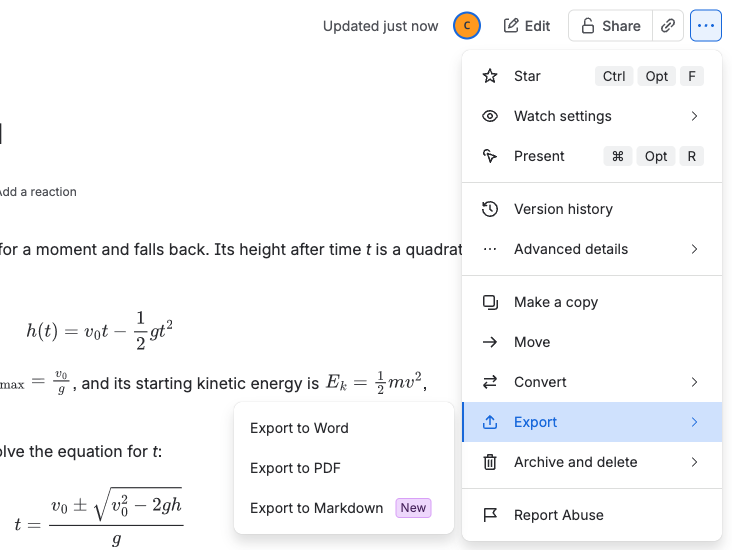
Each formula is rendered by the same engine as on the page, so the export looks like what you see. Nothing is attached to your page: formulas are drawn fresh for every export.
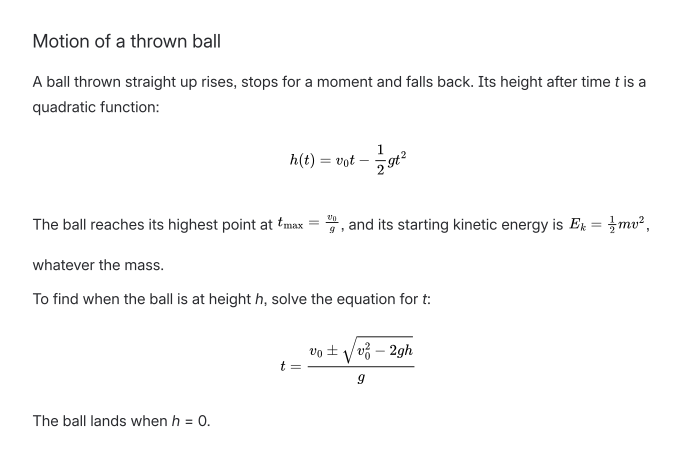
Good to know
- Large size formulas are exported larger, as on the page.
- Wide formulas in Word are scaled down to fit the page width.
- Big pages take longer to export, because each formula is drawn separately. Pages with dozens of formulas export fine, but give it a moment.
- Markdown export (Export to Markdown) leaves formulas out. Confluence doesn’t include app elements in Markdown, for any app.
- Word export creates a document that opens in Microsoft Word and other word processors. Formulas are images there, so they can’t be edited as Word equations.
Note
If an export comes out blank or fails for every page — not only pages with formulas — the problem is with Confluence’s export, not the app. Try again later, or contact Atlassian support.