 Cheese Wheels Apps
 LaTeX
LaTeX docs
Add a block formula
A block formula sits on its own line — use it for equations you want to stand out.
Add a block formula
Open the page for editing and put the cursor on an empty line.
Type
/latexand choose LaTeX block formula.Type your formula in the code box, for example
x = \frac{-b \pm \sqrt{b^2 - 4ac}}{2a}. The preview above it updates as you type.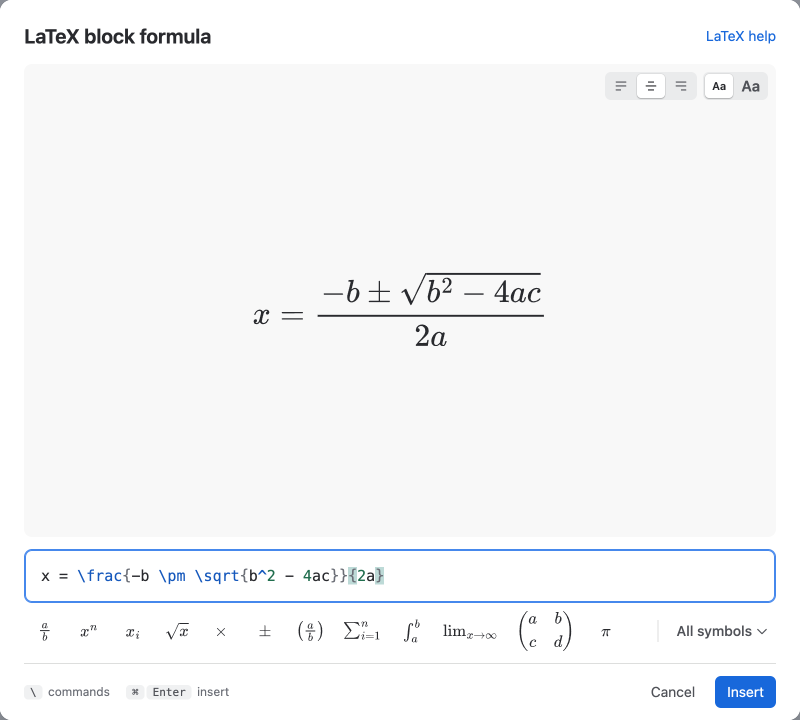
Optionally, choose the alignment (left, centre or right) and size (normal or large) with the buttons in the preview.
Choose Insert, or press Ctrl Enter (⌘ Enter on a Mac).
Publish or update the page.
Tip
You can also insert the formula from the + (Insert) menu in the editor toolbar: search for LaTeX.
Block or inline?
| Use a block formula when… | Use an inline formula when… |
|---|---|
| the formula is the point of the paragraph | the formula is part of a sentence |
| it’s tall: fractions, sums, matrices, several lines | it’s short: a variable, xᵢ, a² + b² |
| you want to align it left, centre or right | it should flow with the text |
Equations on several lines
To align several equations, use aligned inside the formula, with & before the sign to align on and \\ between lines:
\begin{aligned}
  f(x) &= (x + 1)^2 \\
       &= x^2 + 2x + 1
\end{aligned}
You can also use align, gather and equation — but then that environment must be the whole formula, as in LaTeX itself. See LaTeX basics.